
How to Migrate Your Legacy Charts into the New Drum Chart Builder App
Move your charts into the new version of Drum Chart Builder
A Note to Legacy Users from Liz Ficalora
Thank you for using the legacy version of Drum Chart Builder. I hope this migration process for your charts is simple and easy for you to do. You will find the new version of Drum Chart Builder to be stable and fast. I designed a new notation program into the app upon requests from users like you. I like is much better and it is very accurate. The new metronome is also very accurate.
I have tried to add as many requests as possible at this time and more is coming.
I am not done. My vision is not complete yet so expect more features in the coming months.
I will keep you in the loop with updates in my next Drum Chart Builder Newsletter.
Learn the New App While Migrating Your Charts.
Today I’m gonna show you how to migrate your drum charts in the your current drum chart builder account into the new drum chart builder app…. You will be able to migrate your charts one by one only.
This will give you the opportunity to only move over the charts that you want to keep.
The migration process will import all song information and song form which will be a time saver.
Since we have built a new notation program, your notation will have to be manually added to your chart. You will be able to copy and paste in all text that you have added to your chart.
Connect your Legacy account to the new Drum Chart Builder App
Go to your current Drum Chart Builder My Account page…
This is where you will see your user ID under your email.
Copy that user ID…
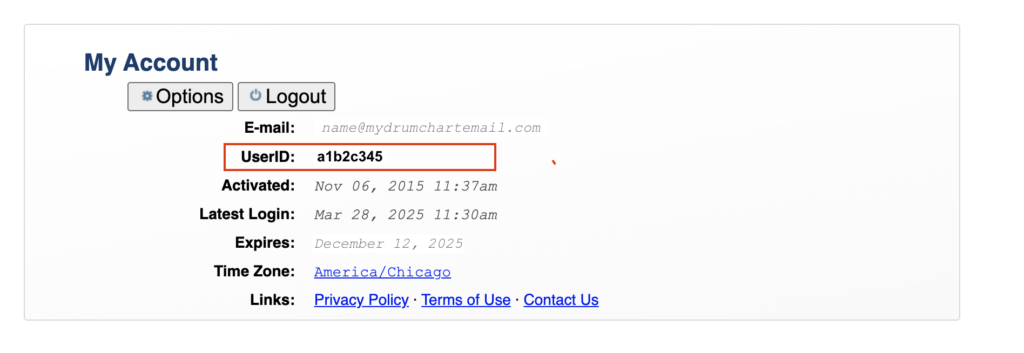
Open an Account in the New Drum Chart Builder App.
Open an account in to the new version of drum chart builder and go to your account page by selecting the account icon in the bottom menu.
On your account page…you will see a place at the bottom of the page that says Legacy UserID
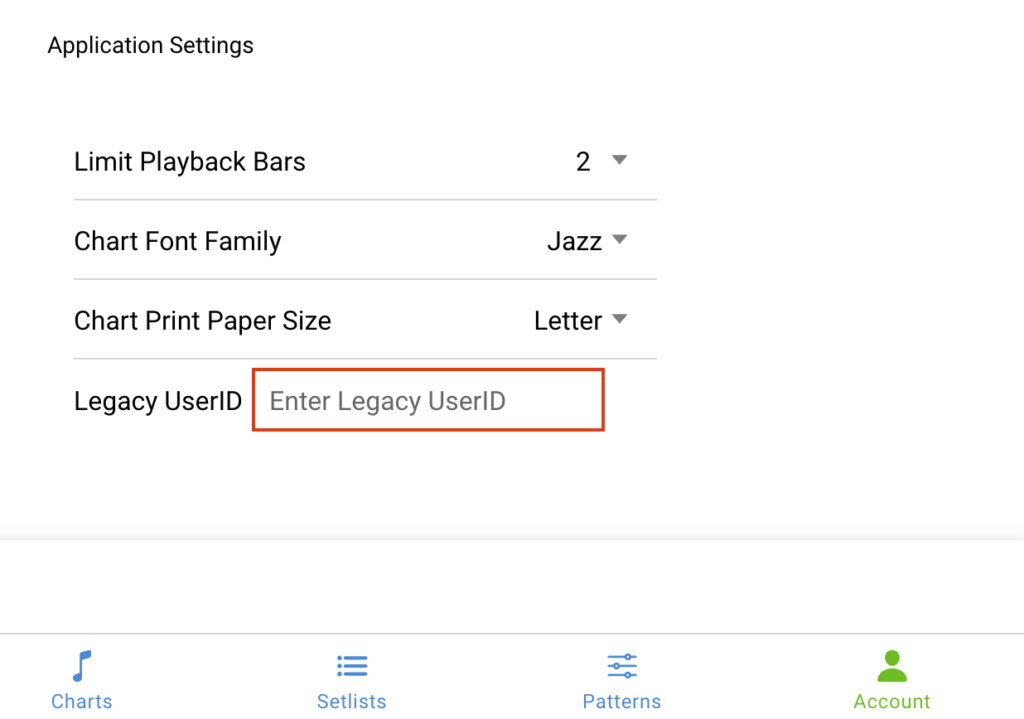
Paste your legacy user ID there..
Now your new account is connected to your legacy account where you’ll be able to migrate your charts from the legacy version…into the new version…
To Migrate a Chart
Choose a chart in your library that you would like to migrate over and open the chart in the edit mode.
In the browser url is the chart number. It is a combination of numbers and letters.
Example: https://drumchartbuilder.com/chart/edit/XX067576
Copy that chart number.
Go over to the new version of Drum Chart Builder and choose the charts icon to open the chart library page from the bottom menu.
At the top of the page select the Import Legacy Chart button.

This will open a popup window. Paste the chart number here and select import Chart….

Only the chart song form will import at this time. Now that your chart has been imported, add the drum patterns using the new drum pattern editor and copy your patterns into your chart. You can copy and paste all text into the chart as well.
Thank you for using the Legacy version of Drum Chart Builder and I hope you will enjoy the new and improved Drum Chart Builder App.
Sincerely,
Liz Ficalora
